Biosha: A Handwritten Font That Feels Human—Not Just Decorative
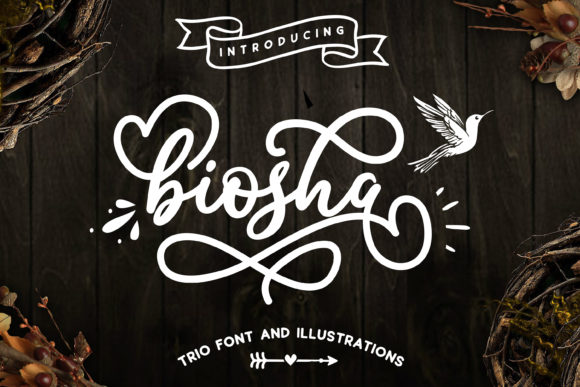
Biosha isn’t just another script font you find in a free bundle and forget about. It’s a carefully crafted handwritten typeface with genuine rhythm, natural stroke variation, and subtle imperfections that make it feel authentically human—not robotic or over-polished. Designers, small business owners, educators, and content creators reach for Biosha when they want warmth, personality, and approachability without sacrificing legibility or professionalism.
Why Biosha Stands Out (and Why That Matters)
Most handwritten fonts fall into one of two traps: either they’re too stiff—digitally traced and lifeless—or too chaotic, sacrificing readability for “character.” Biosha avoids both. Its lowercase letters have gentle entry and exit strokes, its capitals carry confident weight without shouting, and spacing is tuned so words breathe naturally—not cramped, not loose. That balance makes it effective across real-world uses: wedding invitations that feel intimate, social media graphics that stop scrollers, course landing pages that build trust, or product packaging that whispers quality instead of yelling sales.
Common Missteps—and What They Cost You
Even well-intentioned users often misapply Biosha in ways that dilute its strength—or worse, undermine their message entirely. Here’s what to watch for:
Assuming “handwritten” means “casual”—and using it everywhere
Using Biosha for body text, legal disclaimers, or data tables may look charming at first glance—but it quickly fatigues readers and reduces comprehension. Biosha shines at medium-to-large sizes (24px and up) for short, high-impact phrases: headlines, quotes, callouts, or brand names. Mistaking it for a workhorse font leads to poor accessibility, slower scanning, and higher bounce rates—especially on mobile.
Pairing it with overly decorative companions
Some designers pair Biosha with another script or ultra-thin sans-serif, thinking “more personality = better contrast.” But contrast should serve clarity—not compete. Biosha pairs best with clean, neutral sans-serifs like Inter, Lato, or Open Sans—fonts with open counters and even color. When both typefaces fight for attention, your hierarchy collapses, and your message blurs.
Overlooking licensing before launching a project
Biosha is available under multiple licenses—personal, commercial, web, and app use—and each has clear boundaries. Using the free trial version in a client’s e-commerce banner, or embedding it in a SaaS dashboard without the proper license, risks takedowns, legal notices, or forced redesigns mid-launch. It’s not about restriction—it’s about fairness to the designer who built Biosha and reliability for your own work.
Skipping optical size testing
What looks elegant at 48px on your 27-inch monitor may turn muddy at 32px on an iPhone. Biosha’s fine details—like tapered terminals and delicate joins—need breathing room. Always test at actual usage sizes and on real devices. If text feels “fuzzy” or letters start merging visually, increase size slightly or tighten tracking by 10–20 units—not more. Small adjustments here preserve charm *and* function.
How to Use Biosha Well—Without Guesswork
You don’t need advanced typography training to get Biosha right. Focus on these practical checks before finalizing:
- Ask yourself: “Is this the first thing people should read—or the emotional accent?” If it’s primary information (prices, instructions, deadlines), choose a legible sans-serif. Reserve Biosha for moments where tone matters most: a tagline, testimonial intro, or section divider.
- Preview with real content—not lorem ipsum. Try your actual headline, not “Biosha Sample Text.” Phrases with repeated letters (like “coffee,” “beautiful,” or “free shipping”) reveal how letterforms interact. Notice if ‘o’s feel closed, if ‘f’s collide with following letters, or if ascenders/descenders clip neighboring lines.
- Check contrast against your background. Biosha’s thin strokes need sufficient contrast—especially on light backgrounds. Avoid pale gray text on white; aim for at least a 4.5:1 contrast ratio. Test with browser tools like axe or WAVE, not just your eyes.
- Verify file format compatibility. If you’re using Biosha on a website, confirm you’re serving WOFF2 (not just OTF or TTF). For print, embed the font properly in PDFs or convert to outlines if sharing files externally—preventing substitution surprises.
A Better Way to Evaluate Biosha—Before You Commit
Instead of downloading every variant and hoping it fits, take five minutes to map your actual use case:
- Where will Biosha appear? (e.g., Instagram story, Shopify banner, printed brochure)
- What’s the longest line of text it’ll carry? (Keep it under 6–8 words for optimal impact)
- Who’s reading it—and under what conditions? (e.g., parents scrolling on lunch break, students reviewing course materials on laptops)
- What’s the goal? (To evoke calm? convey creativity? highlight authenticity?)
- What’s already working in your current design system? (Biosha should complement—not replace—your established voice.)
If your answers point toward emotional resonance, human-scale messaging, and intentional emphasis—Biosha is likely a strong fit. If you need speed, scalability, or dense information delivery, it’s probably not the right tool for *that specific job*. And that’s okay. Great design isn’t about forcing one font to do everything—it’s about choosing the right voice for each moment.
Final Thought: Let Biosha Breathe
The most effective Biosha designs share one trait: restraint. A single line of Biosha on a clean layout carries more presence than three lines crammed into a busy composition. Give it space. Respect its rhythm. Trust its authenticity—not as decoration, but as intention. When used thoughtfully, Biosha doesn’t just look beautiful—it helps people feel seen, understood, and invited in. That’s not just good typography. It’s thoughtful communication.