Planolla: An Artistic Script Font for Creative Craft
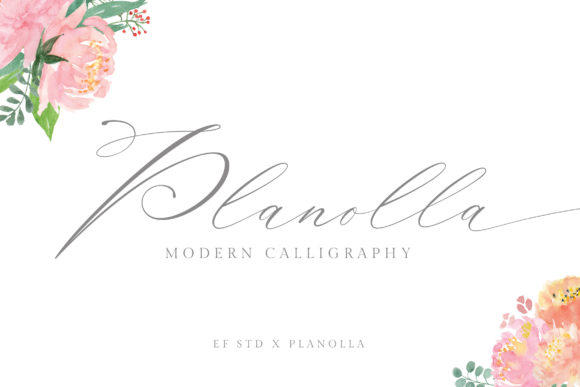
Planolla isn’t just another script font—it’s a quiet, confident presence on the page. Its delicate strokes, subtle contrast, and graceful connections invite attention without demanding it. Designed with intention rather than trend, Planolla balances organic flow with refined structure. That duality makes it unusually versatile: equally at home on a hand-lettered wedding invitation and a minimalist brand identity system.
What Makes Planolla Stand Out
Unlike many decorative scripts that prioritize flair over function, Planolla was built for legibility *and* artistry. Its lowercase letters feature open counters, generous spacing between characters, and consistent baseline alignment—key traits that support readability at smaller sizes and across digital interfaces. The uppercase forms carry weight and presence without heaviness; the swashes are elegant but restrained, never overwhelming the core shape of the letter.
This balance is why designers return to Planolla again and again—not as a novelty, but as a reliable tool. It doesn’t shout. It speaks clearly, thoughtfully, and with quiet authority.
Creative Applications You Can Start Today
Planolla thrives where intention meets craftsmanship. Here’s how different creators use it—with real-world grounding:
- Small business owners apply Planolla to product labels, packaging copy, and seasonal promotions—especially for artisanal goods like candles, ceramics, or small-batch preserves. A label reading “Honey Lavender Soap” in Planolla feels personal, considered, and trustworthy—not mass-produced.
- Educators and workshop leaders use it for printable handouts, course titles, or slide headers. Because Planolla remains legible even when scaled down to 14–16pt, it works well in hybrid learning environments—both projected and printed.
- Bloggers and content creators deploy Planolla selectively: as a headline font paired with a clean sans-serif body (like Inter or Lato), or for pull quotes and section dividers. One blogger uses it only for her monthly “Letter from the Studio” signature—creating visual consistency and emotional resonance across posts.
- Freelance designers build brand systems around Planolla by using its regular weight for names and headlines, and its light weight for subtitles or taglines. They pair it with neutral typefaces to avoid visual competition—never stacking multiple scripts or overly ornate fonts.
Adapting Planolla Across Platforms and Formats
Planolla performs well digitally—but only when used intentionally. On websites, it shines in hero sections, testimonials, and logo lockups. Avoid using it for navigation menus or long paragraphs. For email newsletters, embed Planolla as a web font *only* in headings—and always define fallbacks (e.g., font-family: "Planolla", "Brush Script MT", cursive;). This ensures your message stays readable even if the font fails to load.
In print, Planolla excels at medium-to-large sizes: business cards (18–24pt for names), greeting cards (28–36pt for greetings), and posters (48pt+ for impact). When printing, request a high-resolution PDF with embedded fonts—and test output on both coated and uncoated paper. Its fine strokes hold up best on smoother stocks.
For social media graphics, limit Planolla to short phrases: Instagram story text overlays (“Join Us”), Pinterest pin titles (“Spring Sketching Kit”), or LinkedIn banner accents (“Design • Teach • Grow”). Always check contrast—light gray text on white backgrounds disappears on mobile screens. Use #333333 or darker for reliability.
Keeping Your Work Clear and Audience-Friendly
Planolla invites expression—but clarity must come first. Ask yourself before applying it:
- Is this text meant to be read quickly—or savored slowly? Use Planolla for the latter.
- Will my audience recognize the tone I’m aiming for? A tech startup’s investor pitch may feel incongruent in Planolla; a botanical skincare brand’s “About” page likely won’t.
- Have I tested legibility across devices? Zoom in on your phone screen. Can you distinguish “a” from “o”, “c” from “e”?
- Does this usage reinforce—not distract from—my message? If the font draws more attention than the words, scale back or simplify.
One freelance illustrator keeps a “Planolla Checklist” pinned to her studio wall: • Always paired with a neutral, highly legible sans-serif
Variations and Stylistic Nuance
Planolla includes stylistic alternates and ligatures—but don’t enable them all at once. Select *one* or *two* that serve your purpose: the “&” ligature for logos, the swash “y” for closing signatures, or the alternate “g” for visual interest in headlines. Overuse dilutes impact and risks inconsistency.
Color matters too. Deep navy (#2A3547), charcoal gray (#4A4A4A), or warm black (#2D2B2B) preserve Planolla’s delicacy better than pure black (#000000), which can make fine strokes appear brittle. For accessibility, maintain a contrast ratio of at least 4.5:1 against the background—check with free tools like WebAIM’s Contrast Checker.
Real Projects, Real Results
A Portland-based stationery shop redesigned their holiday collection using Planolla as the sole display font. They kept product names in Planolla (24pt), descriptions in Open Sans (14pt), and added subtle gold foil accents on cards. Sales increased 22% year-over-year—customers cited “the warmth and care in the typography” in post-purchase surveys.
Another example: a literacy nonprofit used Planolla for student-facing certificates (“Certificate of Storytelling Courage”) and teacher training materials. Educators reported students responded more positively to the documents—calling them “friendly” and “special”—which reinforced the program’s emphasis on dignity and voice.
These aren’t accidents. They’re outcomes of thoughtful pairing, intentional sizing, and respect for the audience’s experience.
Getting Started Thoughtfully
If you’re new to Planolla, begin small. Replace one recurring element—your email signature, your portfolio site’s “Work” heading, or your Instagram bio name—with it. Observe how it changes perception. Does it feel more personal? More polished? Does it align with how you want people to feel when they see your work?
Then expand deliberately. Try it in two formats (e.g., a printed card + matching digital banner). Compare side-by-side. Note where it sings—and where it stumbles. That feedback loop is where Planolla becomes more than a font: it becomes part of your creative vocabulary.
Its elegance isn’t fragile. It’s functional. Its delicacy isn’t limiting—it’s precise. And when used with purpose, Planolla helps your ideas land not just seen, but felt.