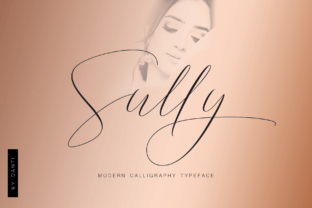
Sully Font
Sully is an elegant handwritten typeface designed to evoke natural, human-written character. It features subtle variations in stroke weight, gentle irregularities in letterform alignment, and organic entry and exit strokes—hallmarks of authentic pen-on-paper writing. Unlike script fonts that rely on exaggerated flourishes or rigid calligraphic structure, Sully prioritizes readability and warmth without sacrificing personality. Its design balances consistency with imperfection, making it feel both intentional and approachable.
Why Consider Sully?
Designers, small business owners, content creators, and individuals preparing personal documents often seek typefaces that convey sincerity, refinement, or individuality. Sully meets that need in contexts where typography plays a supporting—but meaningful—role in communication. Its natural characteristics make it especially relevant for projects where tone matters as much as information: wedding invitations, personal blogs, artisanal branding, social media graphics, or hand-signed digital notes.
Users drawn to Sully typically value authenticity over uniformity. They may be comparing it against other script or handwritten fonts—not just for visual appeal, but for how well it integrates into real-world workflows. That includes considerations like licensing clarity, technical compatibility, and adaptability across formats (print, web, mobile).
Key Benefits of Sully
- Readability at moderate sizes: While many handwritten fonts blur legibility below 24pt, Sully maintains clarity down to 16pt in print and 18px on screen—making it viable for body text in short-form applications like email headers or Instagram captions.
- Low visual fatigue: Its restrained contrast and open letterforms reduce eye strain compared to high-contrast scripts, supporting longer engagement in digital contexts.
- Cross-platform stability: Available in standard OpenType (.otf) and web-friendly WOFF2 formats, Sully renders consistently across browsers and design tools including Adobe Creative Cloud, Figma, and Canva (when uploaded as custom font).
- Signature-ready versatility: The lowercase “s”, “y”, and “l” include alternate glyphs optimized for signature use—offering variation without requiring manual ligature adjustments.
Tradeoffs and Practical Considerations
No handwritten font excels in every context—and Sully is no exception. Its strengths lie in expressive, human-scale applications; its limitations become apparent in environments demanding strict neutrality or high-density information display.
For example, Sully is not suited for long-form body copy in articles or reports. Its irregular baseline and variable spacing can slow reading speed over extended passages. Similarly, it performs poorly in data-heavy layouts—such as comparison tables, financial summaries, or technical documentation—where typographic hierarchy depends on precise alignment and consistent letterfit.
Licensing is another practical factor. Sully is distributed under a commercial license that permits use in client work, but requires separate permissions for embedding in mobile apps or SaaS platforms. Users intending to deploy it in software interfaces should verify license scope before integration.
Also worth noting: while Sully includes Latin characters and common punctuation, it lacks extended language support (e.g., Cyrillic, Greek, or Vietnamese diacritics). Projects targeting multilingual audiences may require supplemental fonts or custom glyph extensions.
When Sully Is a Strong Fit
Sully aligns well with goals centered on personalization, emotional resonance, or brand differentiation within constrained visual spaces. It works effectively when:
- You’re designing printed materials like wedding stationery, boutique business cards, or handmade product labels where tactile authenticity reinforces perceived quality.
- Your digital presence emphasizes voice and identity—such as a lifestyle blog author using Sully for post titles and pull quotes, paired with a neutral sans-serif for body text.
- You need a signature-style element for branding—like a founder’s name in a logo lockup or a handwritten tagline beneath a clean logotype.
- You’re creating social media visuals for niches valuing craft and intentionality (e.g., ceramic studios, independent bookshops, wellness practitioners), where typography contributes to audience alignment.
When to Explore Alternatives
Consider other options if your project requires:
- High legibility at small sizes: Fonts like Quicksand or Playfair Display offer more predictable rendering below 14px and broader language coverage.
- Dynamic typographic hierarchy: For editorial layouts needing multiple weights (light, bold, italic), Sully’s single-weight release limits flexibility. A family like DM Serif Display provides optical sizing and axis-aligned italics better suited to complex hierarchies.
- Strict accessibility compliance: While Sully meets basic WCAG contrast thresholds when used appropriately, its decorative nature means it shouldn’t serve as primary interface text. For UI elements requiring AA or AAA conformance, pairing it with an accessible system font (e.g., Inter, Roboto) is necessary—and sometimes insufficient for form labels or navigation menus.
- Brand scalability: If your visual identity will expand into signage, apparel, or video motion graphics, test Sully across mediums early. Its delicate terminals and thin strokes may not translate cleanly to embroidery, vinyl cutouts, or low-resolution screens without modification.
Making a Practical Decision
Evaluating Sully isn’t about whether it’s “good”—it’s about whether it serves your specific objective with minimal compromise. Start by clarifying the role typography plays in your project: Is it atmospheric? Functional? Identity-defining? Then assess constraints—technical, linguistic, legal, and perceptual.
A useful exercise is to mock up two versions of a key asset (e.g., an invitation or homepage hero section): one using Sully, one using a neutral alternative. Compare them side-by-side for tone, clarity, and appropriateness—not just aesthetics. Ask whether Sully enhances understanding or distracts from it. Does it support your message—or compete with it?
Also consider workflow impact. If you rely heavily on cloud-based tools with limited font upload capabilities (e.g., Mailchimp templates or certain CMS builders), confirm Sully is supported before committing. And if your team includes non-design stakeholders, gauge their comfort with its stylistic choices—subjective preferences can influence adoption as much as technical suitability.
Finally, remember that typography functions best in relationship—not isolation. Sully gains strength when paired deliberately: with generous whitespace, muted color palettes, and uncluttered layouts. Its elegance emerges not from complexity, but from restraint.